Control Your Qerios Inbox: Stop Blasts and Turn Off Profile Questions
How to use the Qerios inbox controls to stop receiving blasts or disable questions from your profile, and how to pick the right combination for your situation.
An overflowing inbox is a good problem until it is not. Qerios gives you two separate switches to keep it manageable: one for blasts and one for questions that arrive through your profile. Understanding the difference helps you turn down the noise without cutting yourself off from the people you do want to hear from.
Two kinds of incoming questions
Questions reach you in two ways. Direct questions come from people who open your Ask link or your profile and write to you specifically. Blasts are questions sent out to many people at once, so you may receive one even if the sender has never visited your profile. The guide to direct questions versus blasts covers the difference in detail.
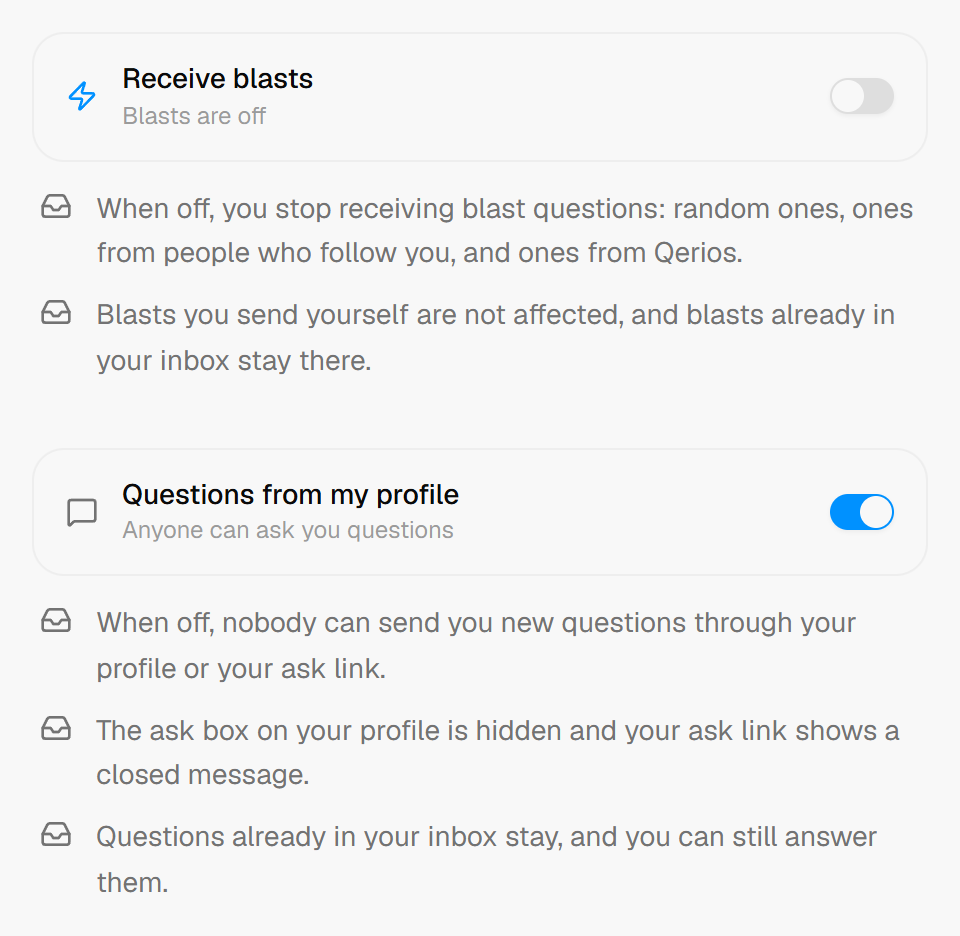 The two inbox controls in Qerios settings (shown here with blasts switched off).
Stop receiving blasts
If your inbox fills with questions from people you do not know, turning off blasts removes that stream. After you do, you only receive questions that people deliberately address to you. This is the best first step when the volume is the problem, since you keep your Ask link working for friends and followers.
Disable questions from your profile
The second switch turns off questions sent through your profile. Use it when you need a real break: exam season, a stressful week, or a period when you do not want to answer anything. When it is on, people who visit your profile are told they cannot send you questions, so nobody is left wondering why you have not answered. Existing questions and answers stay where they are, and you can switch it back on whenever you are ready.
Which combination fits you
- Too many questions from strangers: turn off blasts, keep profile questions on.
- You want a full pause: turn off both, then re-enable profile questions when you return.
- You want to be reachable only by people you know: combine a private account with blasts off. See private accounts on Qerios for what the private setting does.
- You are happy with the volume: leave everything on and rely on notification settings instead.
Do not forget notifications
Inbox controls decide what arrives. Notification settings decide what interrupts you. If a stream of likes and replies is the real annoyance, take control of your notifications rather than closing your inbox. Many people find that muting a notification type is enough.
What to do about unwanted individual messages
The inbox switches are for volume, not for harassment. If one person keeps sending unwanted content, block them and report the account when appropriate. Blocking versus reporting explains which to use when.
The short version
- Blasts and profile questions are two independent switches.
- Turn off blasts to cut stranger traffic but keep your Ask link working.
- Turn off profile questions for a full break; you can re-enable them any time.
- Use notification settings for interruptions and blocking for individuals.